Smart • Secure • Scalable ICT Solutions +67583229578 info@koaict.com
KOA · BUSINESS APPLICATIONS

Better control.
Every working day.

From stock requests to maintenance work orders, explore practical systems that help your team plan, record and follow through.

Inventory & operationsAssets & maintenanceTeam collaboration
Rack of servers in a data centre
KOAConnected information.
Clearer decisions.
THE SYSTEM COLLECTION

Built around the way teams work.

Explore the principal workflows and discuss a configuration for your business.

9 systems & projects

HR File 201 – Digital Employee Records system screenshotCollaborationWatch presentation

HR File 201 – Digital Employee Records

A secure digital employee-records platform that keeps the complete employment lifecycle in one auditable 201 file – from hiring through final clearance.

Explore features
  • Employee 360° profile and complete employment timeline
  • Recruitment, hiring, movements, leave, attendance and performance
  • Digital file cabinet with document history and expiry alerts
  • Employee cases, investigations and disciplinary records
  • Issued company property with quantity, unit price and total value
  • Separation and controlled clearance with outstanding-item checks
  • Role-based permissions, confidential access and complete audit trail
  • Management dashboards and Excel, PDF and CSV reporting

Built for controlled HR recordkeeping with alerts for contracts, probation, documents, training certificates, approvals, property returns and clearances.

Discuss this system
Bundle of blue network cables in a rackOperations

Inventory, Requisition & Issuance

Follow stock from request and approval through receiving, issue and transaction history.

Explore features
  • Item and stock-category management
  • User access by assigned stock category
  • Requisition and approval workflows
  • Goods receiving (GRN) and item issuance
  • Attachments and transaction history
  • Role-based access and operational reports

Optional integration: set a low-stock threshold for each item, such as 5 or 10 units, and notify assigned recipients by email or SMS.

Discuss this system

Maintenance & Work Orders

Organize maintenance requests, planned servicing and the work needed to keep equipment available.

Explore features
  • Maintenance request intake
  • Equipment and asset references
  • Work-order creation and assignment
  • Preventive maintenance schedules
  • Priority, due-date and progress tracking
  • Service history and completion reporting

Proposed integration: generate scheduled work orders, notify assigned technicians and escalate overdue tasks. Exact available modules require verification against your maintenance system.

Discuss this system
Security camera mounted on a ceilingInfrastructure

ICT Assets, IP, CCTV & Rentals

Bring device records, network addresses, camera servicing and rental tracking into one operational view.

Explore features
  • PC and IT asset inventory with asset codes
  • IP address assignment and availability
  • CCTV records, images and maintenance history
  • Repair status, condition, vendor and costs
  • Rental agreements and monthly rental tracking
  • Individual and bulk QR labels
  • Branch, department, location and status filters
  • Excel/PDF reports and configurable columns

Optional integration: equipment service reminders, rental renewal alerts and notifications to the person responsible for an asset.

Discuss this system
Server rack with cabling in a server roomOperations

Production Planning & Monitoring

Plan production, capture output and review performance across branches and production lines.

Explore features
  • Weekly plans and execution planning
  • Hourly actual production and run history
  • Downtime, CIP and changeover recording
  • SKU, line and capacity master data
  • Syrup and packaging consumption history
  • Output, efficiency and achievement dashboards
  • Branch access, snapshots and Excel/PDF reporting

Optional integration: scheduled production summaries and notifications when agreed output or downtime limits are exceeded.

Discuss this system

Rental & Property Management System

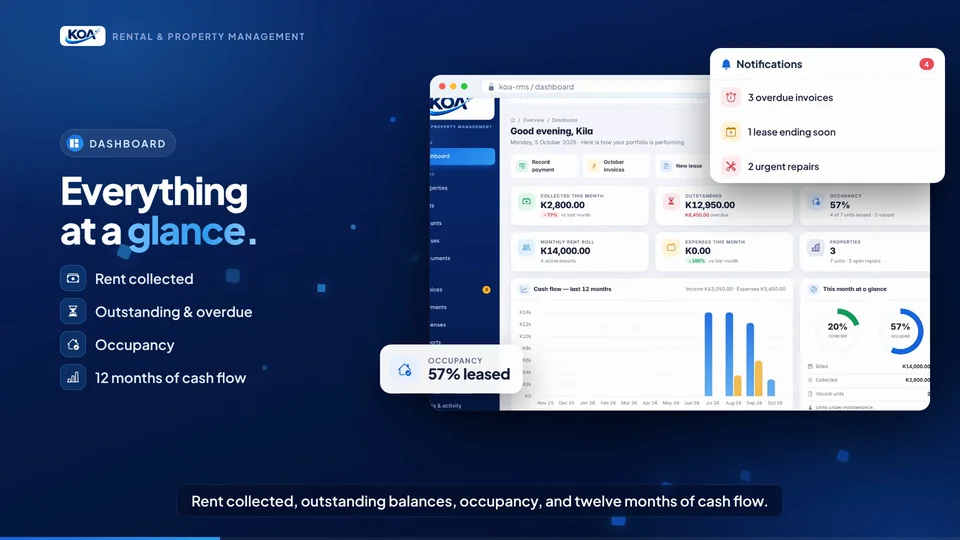
Manage properties, tenants, leases, billing, collections and reports from one secure operational workspace.

Explore features
  • Property and unit portfolio management
  • Tenant, lease and document records
  • Rent invoicing, receipts and payment tracking
  • Outstanding balances, arrears and occupancy dashboard
  • Multi-currency support and management reports
  • Tenant self-service portal and repair requests
  • Role-based access, backups and responsive interface

Optional integration: recurring rent invoices, lease-expiry reminders, overdue-balance alerts and tenant notifications by configured email or SMS provider.

Discuss this system

Sari-Sari Store Management System

Run day-to-day sari-sari store sales, stock, purchasing, customer utang, GCash and profit reporting from one easy-to-use system.

Explore features
  • POS with Cash, GCash and Utang payments
  • Product, SKU, category and supplier management
  • Purchase cost, selling price, markup and profit calculations
  • Inventory alerts, adjustments and physical-count controls
  • Customer credit limits and overdue Utang tracking
  • Cash drawer, GCash cash-in/cash-out and bill payments
  • Daily sales, profit, expense and product-performance reports
  • PDF/Excel exports with responsive light/dark interface

Optional integration: low-stock alerts, overdue-Utang reminders, supplier price-change reviews and scheduled daily sales/profit summaries.

Discuss this system
Padlock resting on a laptop keyboardCollaboration

UAT & Testing Management

Coordinate test cases, branch participation, tester feedback and sign-off before a system goes live.

Explore features
  • Modules and test-case organization
  • Multiple testers per test case
  • Selected test-case assignments per user
  • Branch-based activity and reporting
  • Feedback, progress and completion summaries
  • Per-tester sign-off with date and author
  • Admin, tester and viewer access
  • Activity logs and Excel/PDF summaries

Optional integration: tester assignment notices, outstanding-test reminders and sign-off follow-ups.

Discuss this system
Rack of servers in a data centreCollaboration

Company Portal & Knowledge Hub

Give teams a central place to find company resources, internal links and shared information.

Explore features
  • Company resources and internal links
  • User access and content management
  • Document and file access
  • Video and gallery content
  • Search across portal information

Optional integration: content update notices and scheduled announcements to selected staff groups.

Discuss this system

Capability overview based on project scope; availability depends on the deployed version. Photos illustrate technology services and are not screenshots of client systems. Request a walkthrough for the exact modules and integrations available.

LATEST PROJECT · HR DIGITALISATION

HR File 201 – Digital Employee Records System

One secure, permanent and auditable employee record covering the full employment lifecycle. The system centralises employee information, documents, movements, company property, cases, leave, attendance, performance, training, separation and clearance.

Secure · Auditable · Role-based
0:00 / 0:00

Zoom in to read details: use the zoom buttons or hold Ctrl and scroll. Drag to move around; double-click to zoom on a spot.Pinch to zoom in and read details. Drag to move around; double-tap to zoom on a spot.

PROJECT HIGHLIGHTS

From hiring to clearance, in one record.

  • 360° employee profile and employment timeline
  • Digital documents with expiry monitoring
  • Issued assets with value and return history
  • Cases, discipline, leave, attendance and performance
  • Controlled separation and clearance workflow
  • Role-based security and complete audit trail
  • Excel, PDF and CSV management reporting
Discuss a similar project

The presentation uses demonstration employee data to illustrate the system interface and capabilities.

FEATURED SYSTEM · MAINTENANCE MANAGEMENT

KOAICT Maintenance System – Computerized Maintenance Management

A closed-loop maintenance system that takes every job through eleven steps, from the first request to verified close-out and continuous improvement. Requests arrive with photo evidence, work is planned and scheduled without conflicts, and no job is closed until it has been verified.

Closed-loop · 11 steps · Version 3.7
0:00 / 0:00

Zoom in to read details: use the zoom buttons or hold Ctrl and scroll. Drag to move around; double-click to zoom on a spot.Pinch to zoom in and read details. Drag to move around; double-tap to zoom on a spot.

Chapters17 sections
SYSTEM HIGHLIGHTS

From request to verified close-out.

  • Secure sign-in and a live maintenance dashboard
  • Requests with photo evidence, reviewed and prioritised
  • Work orders planned with Smart Schedule and conflict checks
  • Spare parts, stock and purchasing linked to each job
  • Inspections that raise corrective work
  • No closure without verification and requestor confirmation
  • Time-based and meter-based preventive maintenance
  • Asset register with QR labels
  • Performance reports and improvement actions
Discuss a similar project

Presentation of the KOAICT Maintenance System, version 3.7. Jump to any step using the chapter list.

FEATURED SYSTEM · PROPERTY MANAGEMENT

KOA Rental & Property Management System

A smart, secure and scalable platform for managing properties, tenants, leases, rent collection, invoicing, balances and management reporting in one place.

Property · Tenants · Billing · Reports
0:00 / 0:00

Zoom in to read details: use the zoom buttons or hold Ctrl and scroll. Drag to move around; double-click to zoom on a spot.Pinch to zoom in and read details. Drag to move around; double-tap to zoom on a spot.

Chapters7 sections
SYSTEM HIGHLIGHTS

Manage the rental lifecycle from one workspace.

  • Property and unit portfolio with tenant and lease records
  • Dashboard for collected rent, outstanding balances and occupancy
  • Automatic monthly invoicing, payments and professional receipts
  • Late-fee and overdue-rent visibility
  • Multi-currency reporting with Kina base reporting
  • Tenant portal for balances, receipts and repair requests
  • Role-based access, backups, dark mode and responsive screens
Discuss a similar project

Short system presentation using demonstration data. Use the chapter list to jump directly to each major feature.

FEATURED SYSTEM · RETAIL MANAGEMENT

KOA Sari-Sari Store Management System

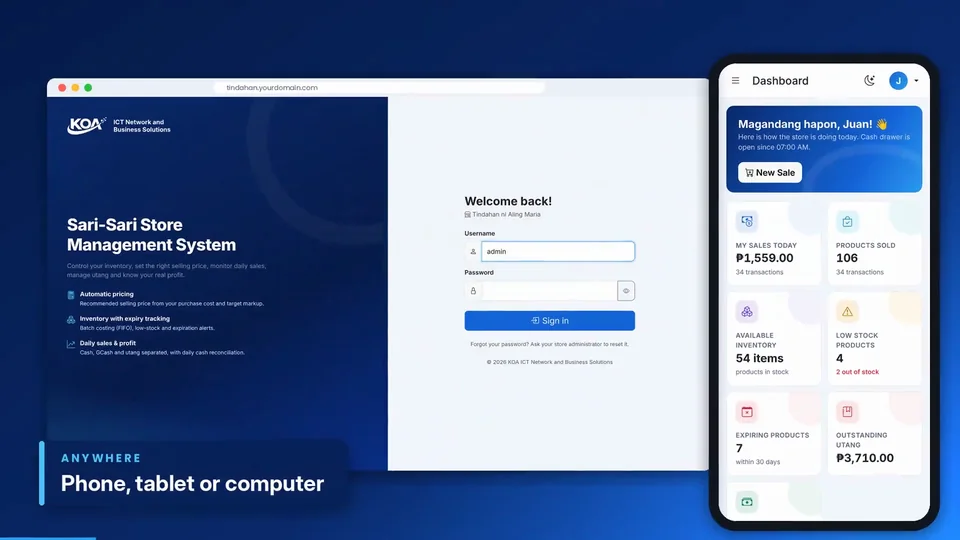
A practical retail system for Philippine sari-sari stores that combines point of sale, inventory, purchasing, utang, GCash, cash control, smart pricing and daily business reporting.

POS · Inventory · Utang · GCash
0:00 / 0:00

Zoom in to read details: use the zoom buttons or hold Ctrl and scroll. Drag to move around; double-click to zoom on a spot.Pinch to zoom in and read details. Drag to move around; double-tap to zoom on a spot.

Chapters11 sections
SYSTEM HIGHLIGHTS

Know what you sold, earned and still need to collect.

  • Dashboard for daily sales, gross profit, estimated net profit and expenses
  • Point of sale with Cash, GCash and Utang payment options
  • Product pricing with markup, profit and gross-margin calculations
  • Purchasing with supplier invoices and delivery cost included in item cost
  • Supplier price-increase alerts with approval before price changes
  • Inventory adjustments for damaged goods and physical counts
  • Customer utang, credit limits and overdue account tracking
  • Cash drawer, GCash cash-in/cash-out and bill-payment controls
  • Best-selling and slow-moving product reports with PDF/Excel export
Discuss a similar project

Short promotional presentation of the KOA Sari-Sari Store Management System. Demonstration figures shown in the video are illustrative.

AUTOMATION OPTIONS

The right reminder.
At the right time.

Set a stock threshold for each item and choose who receives an email or SMS. Maintenance workflows can use schedules to create work orders and notify assigned technicians.

  • Item-specific thresholds, such as below 5 or below 10
  • Assigned recipients for each stock category or asset
  • Repeat-alert controls and delivery history
  • Scheduled maintenance and overdue work-order reminders

Integration required: automatic delivery depends on the source system, a scheduler and configured email/SMS providers. This website does not currently send these alerts or access operational records.

INTERACTIVE WORKFLOW PREVIEW

When should a stock alert trigger?

Illustrative values only. No message will be sent.

4 is below 5: an alert would be triggered.

At exactly the threshold, no “below” alert triggers. A connected system should suppress duplicate alerts until stock recovers, with an optional reminder interval.

FROM REQUEST TO COMPLETION

Maintenance that keeps moving.

01

Request or schedule

Capture a fault or reach a scheduled service date.

02

Create and assign

Generate a work order and assign the responsible technician.

03

Notify and follow up

Send configured reminders and track due dates.

04

Complete and review

Record the work, parts used and completion history.

Example configurable workflow. Live work-order generation requires connection to the maintenance application.

Make your systems work together.

Tell us which workflows you want to connect—from inventory alerts to maintenance and management reporting.